

Designing Your Website's Architecture
by Cedar Studios • 6/6/2024
Web Design
A strong website architecture is simple and predictable. With an intuitive site structure, you can rest assured your users will navigate your site with ease. Below, you will also learn how to structure your website in a web-crawlable format to improve SEO.
What Is Website Architecture?
Typically, website architecture refers to the relationship between your webpages. Which pages are linked together, and how?
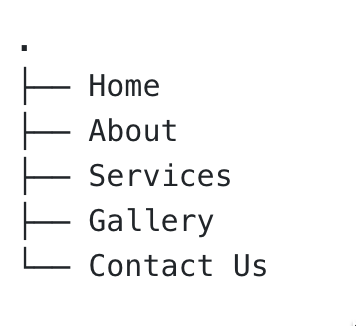
For our 5-page website designs, we use what you will learn is called a ‘flat architecture’ that looks like this:
A more complex architecture may look something like this:

INFO
This site structure was generated in the Breadcrumb Navigation: Best Practices & Examples blog post. Click to learn more about how to navigate a complex website architecture.
Why Is Website Architecture Important for SEO?
Simply put—web crawlers like the common crawl bot (used by Google and other search engines) need to index, crawl, and make sense of your website and its purpose before it is shown to real users.
If your site structure is a mess, that makes it harder for Google to understand and thus properly rank your site.
On the other hand, with an intelligent system of internal links, you can spread topical authority across pages and increase your SEO.
WARNING
Web crawlers also need to see intelligible (i.e., semantic) HTML, which page-builders like Wordpress and Wix often bundle. That’s why we hand code each website for our clients.
Principles of Website Architecture
Proper website architecture is good for both users and SEO.
Good.
How do we go about creating a site structure properly?
Plan your content
First, you need to have a clear idea of what content will go on your website. Your landing page will typically contain a mix of information related to your business, the goods or services is provides, as well as links to important pages within your website.
TIP
Learn more about what makes for good website content—Improve your Content Marketing with a Text-Based Website Design.
For many small businesses, a simple architecture (pictured earlier in this post) is both sufficient for your content needs and is impossible to screw up.
Home/landing page
About page
Service page(s) [good for driving ads to]
Photos/Reviews/miscellaneous page
Contact Us page (with a form)
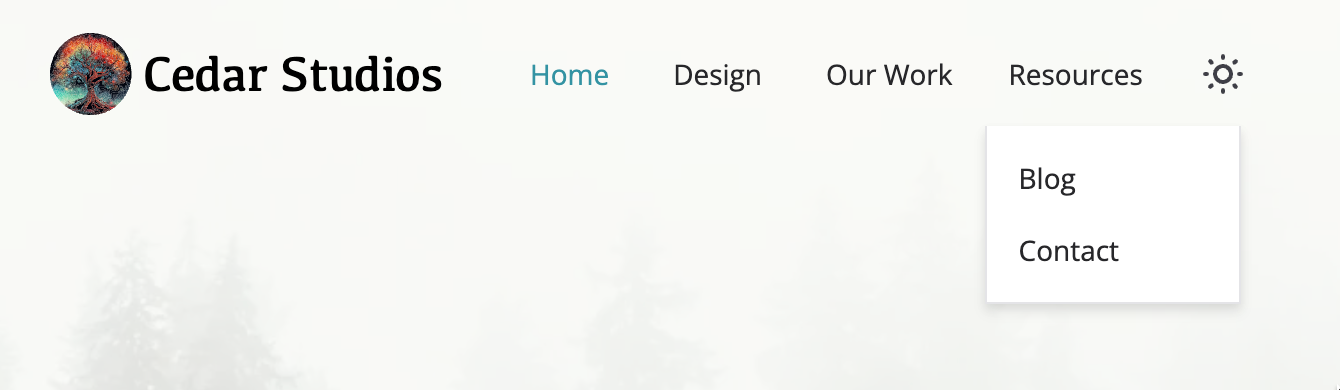
As of this writing, Cedar Studios has over 40 pages, yet our architecture (as presented to the user) is very simple:
Keep your URLs simple and user-friendly
/temp/wp/2023/service-a-roofing-ia/ is a bad url slug.
/services/roofing/ is better.
/roofing/ may be the best, if the page does not need to be nested within /services/.
Keep the url structure of each page short, simple, and typically un-nested.
TIP
If you need to change a bad url slug to a good one, use a 301 Redirect (discussed below).
Use internal linking strategically
Internal linking is a big part of SEO and could be a post (or many posts) within itself.
Here, I will simply say that you want to build content silos with each silo establishing topical authority.
What does that mean?
If you have a construction company, and you offer framing, roofing, and concrete services, then you should have a unique page for each service. Each service can have subpages linked to the top-level service page.
And if you have a blog, only link articles together within a single silo. Don’t link roofing articles to your concrete articles. It doesn’t make sense to readers, and it doesn’t make sense to Google.
Must-Have Files
There are many files that you need to include in your website for better user experience and search engine optimization. Most of these will live at the root of your website, often named as the public folder.
INFO
For less technical must-haves for a business site, read Must-Haves for Small Business Website Design.
XML sitemap
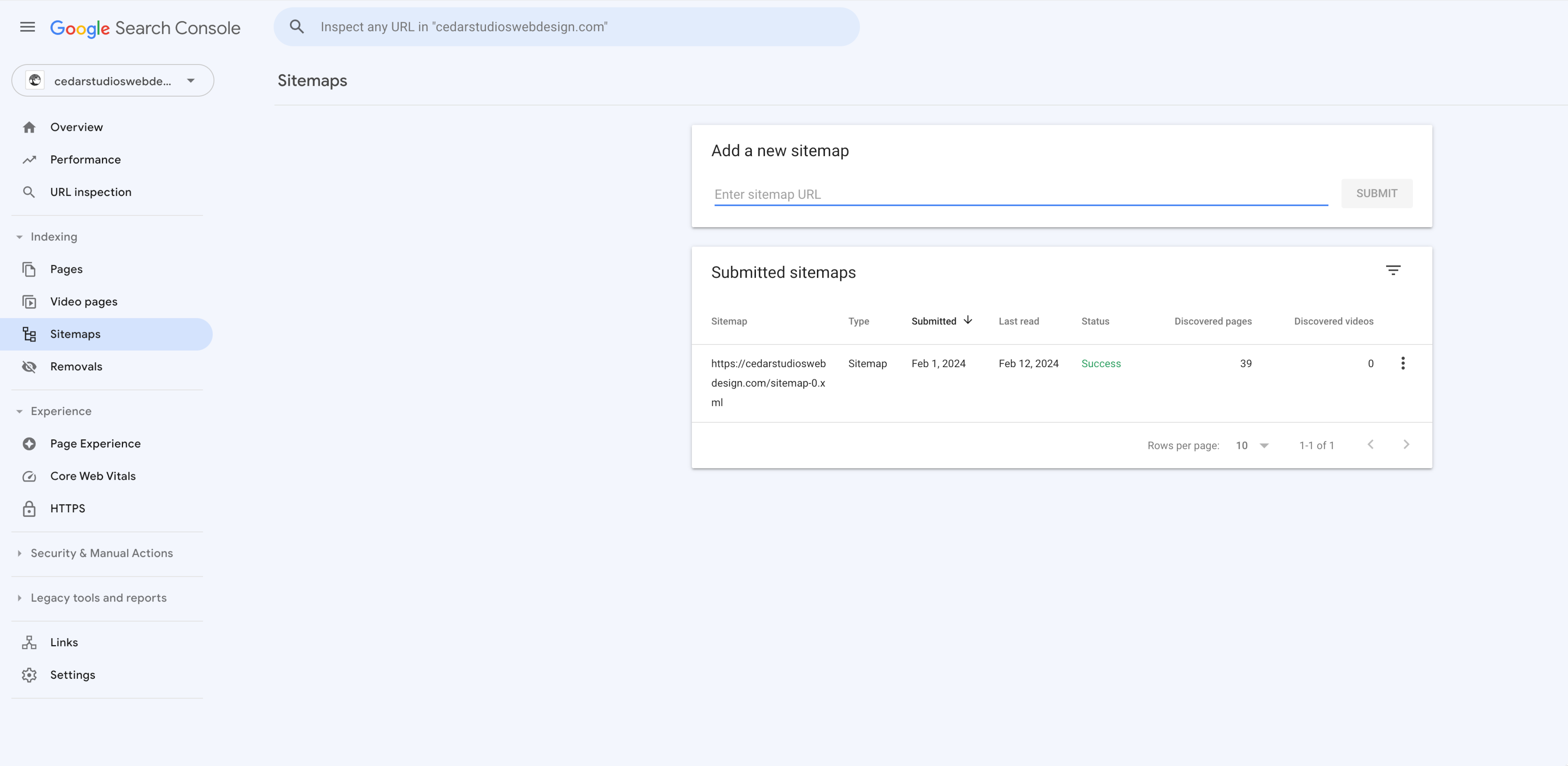
Your website needs a sitemap to tell Google and other web crawlers what pages your website contains, and where they can be found.
You can create a sitemap here. Place this at the root of your website. For example, https://website.com/sitemap.xml.
Make sure to upload this to Google Search Console after it is published.
If you are writing your own HTML, include this tag in the <head> section:
<link rel="sitemap" href="/sitemap.xml" />
Favicons
Favicons are the small image that shows up in your browser tab, or as an app icon if you download the website to your phone.

You will need this image in a number of different resolutions/formats. There is a great tool for generating favicons here.
TIP
From a reader—If you need favicons from files larger than 2 MB, try Website Planet’s tool.
You will also need to link them in the <head> section:
  <link rel="apple-touch-icon" sizes="180x180" href="/favicons/apple-touch-icon.png" />
  <link rel="icon" type="image/png" sizes="32x32" href="/favicons/favicon-32x32.png" />
  <link rel="icon" type="image/png" sizes="16x16" href="/favicons/favicon-16x16.png" />
  <link rel="manifest" href="/favicons/site.webmanifest" />
  <link rel="mask-icon" href="/favicons/safari-pinned-tab.svg" color="#3393a3" />
  <link rel="shortcut icon" href="/favicons/favicon.ico" />
  <meta name="msapplication-TileColor" content="#00aba9" />
  <meta name="msapplication-config" content="/favicons/browserconfig.xml" />
  <meta name="theme-color" content="#ffffff" />
Open-graph image
Open graph images are the previews that are shown on social media websites like Facebook, Instagram, and Twitter when you link to your website. You will want to design an image at 1200x630 pixels (1.9:1 ratio) and check it here.

If you’re doing this by hand, you will need to add a lot to your website’s <head> tag:
<meta property="og:title" content="Website Name">
<meta property="og:type" content="website">
<meta property="og:image" content="https://website.com/opengraph-image.png">
<meta property="og:url" content="https://website.com/">
<meta property="og:description" content="Your meta description here.">
<meta property="og:site_name" content="Website Name">
<meta property="og:image:url" content="https://website.com/opengraph-image.png">
<meta property="og:image:type" content="image/webp">
<meta property="og:image:width" content="1200">
<meta property="og:image:height" content="630">
<meta property="og:image:alt" content="Description of your image.">
Redirects
Redirects, specifically the 301 Redirect (moved permanently) are only necessary if you have changed your website architecture or url slugs in the past.
For example, if you renamed your page /about-us/ to simply /about/, you would need to add an entry to your _redirects file with the old address, followed by a tab, followed by the new address.
/about-us/ /about/
This will automatically redirect the browser to the correct page location, which is important for SEO.
You don’t want dead links or 404 errors on your website. Redirect the user or web crawler to a working page.
Robots

No, not the fun kind.
Your robots.txt file (also placed in the root folder) tells web crawlers what they aren’t allowed to index/crawl.
If you want to block Chat-GPT from scraping your content and providing it for free (aka, taking traffic away from you), add these to your robots.txt file:
User-agent: CCBot
Disallow: /
User-agent: GPTBot
Disallow: /
User-agent: ChatGPT-User
Disallow: /
Some other user agents: Google-Extended (Google’s Bard AI) and PerplexityBot.
Again, these bots will scrape your content and serve it to inquisitive users without linking to your website. Essentially reducing your traffic to line their pockets.
Block ‘em.
Conclusion
Follow these steps to ensure your website is structured in a way that is intuitive for both users and search engine optimization.
User a simple (preferably “flat”) site architecture. If your site is large enough, consider using a breadcrumb navigation.
Keep your urls short and simple.
Build internal links, but only when they make sense.
Include files for SEO (
sitemap.xml,favicons,_redirects, androbots.txt) in your website’spublicfolder.
When in doubt, look at a similar competitor’s site architecture and build something similar. (Remember Jakob’s Law from The 10 Principles of Good Website Design.)
